
Peripheral devices such as mice, keyboards, or speakers connect to your Chromebook either through a wired connection (plugging the device into your Chromebook) or through a wireless, bluetooth connection. This article will explain how to connect a bluetooth device to your Chromebook.
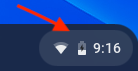
- Click the clock on the bottom right corner of the screen.
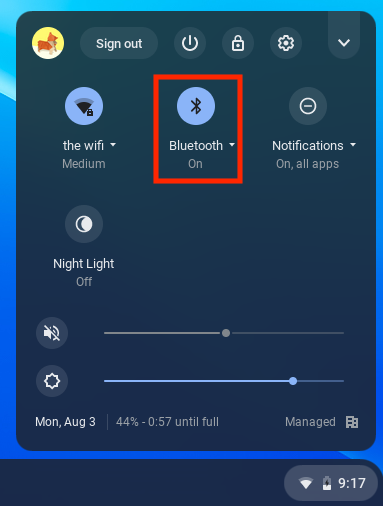
- Click on "Bluetooth".
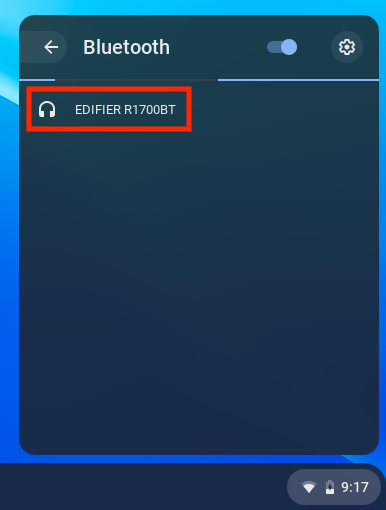
- Make sure your bluetooth device is turned on and ready to pair. Check your device's instructions for details on how to pair it.
- Once your device appears, click it.
- Your device should then appear as connected in your bluetooth settings.
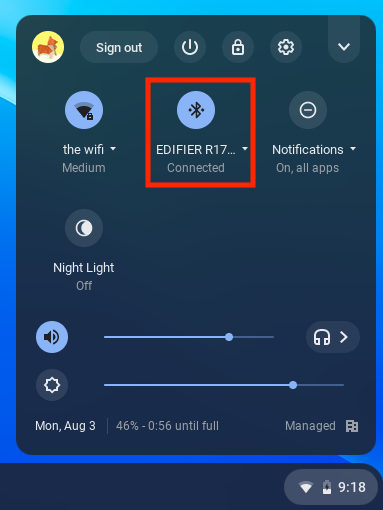
You can pair additional bluetooth devices via the same steps!
If you have any difficulties pairing a bluetooth device, check out the following article to get in touch with tech support: