
If you can't see one of your courses on your Canvas calendar, the course may be hidden. Under the "Calendars" section in the sidebar on the right of your Canvas calendar page, hidden courses will appear greyed out.
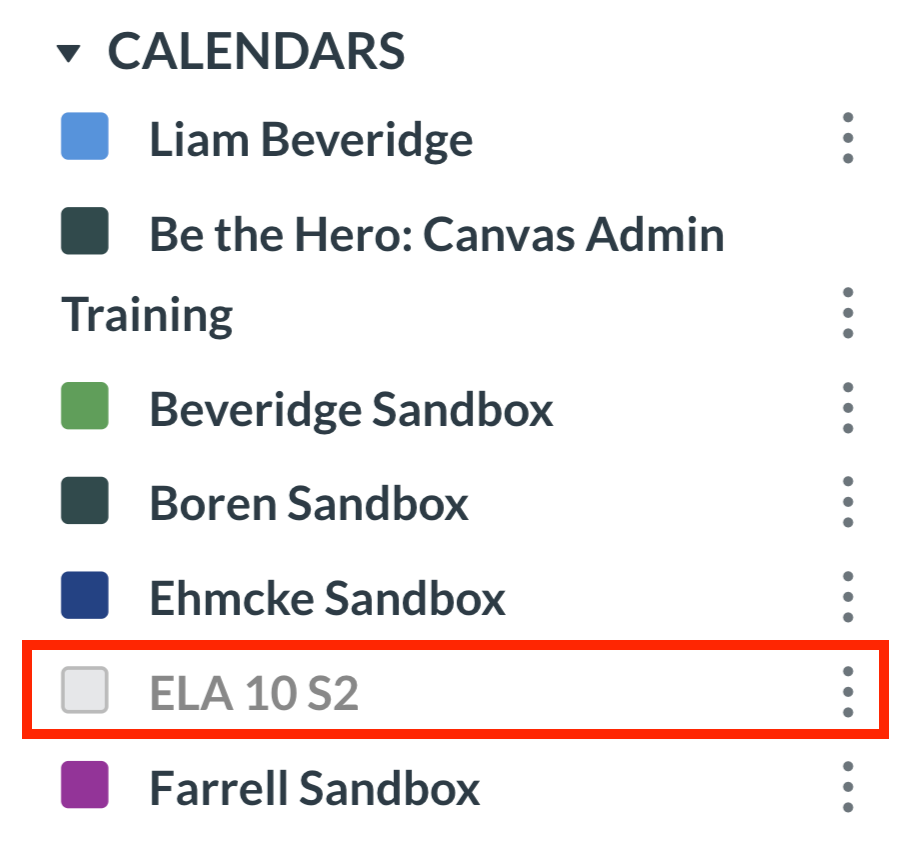
For example, in the above "Calendars" list, the course "ELA 10 S2" is hidden.
To un-hide a course, click the square to the left of the course's name.

The course will then appear on your calendar again!
Note for Parents: If you have multiple students at ORCA, you may have many classes available on your calendar page. Unfortunately, there is a limit on the number of class calendars you can have active at once on your Canvas calendar. We would recommend prioritizing making any classes that meet often visible, and then checking the "Coming Up" section in your Canvas dashboard for a full list of upcoming due dates, or live classes.
If you have any questions about using the calendar in Canvas, check out the following article for information on how to get in touch with tech support: